相关链接
本篇仅以Docker+SQlite+Nginx作最小部署指南
Docker-Compose
登录VPS,创建应用目录:
cd ~/
mkdir waline
cd waline
nano docker-compose.yml并编写docker-compose.yml:
services:
  waline:
    image: lizheming/waline:latest
    container_name: waline
    restart: unless-stopped
    ports:
      - "127.0.0.1:8360:8360"
    volumes:
      - ./data:/app/data
    environment:
      # 时区
      TZ: "Asia/Shanghai"
      # SQLite 本地轻量数据库持久化存储目录
      SQLITE_PATH: "/app/data"
      # JWT 鉴权密钥 (预生成的 16 字节随机 Hex)(生成命令:openssl rand -hex 16)
      JWT_TOKEN: "<RAND_HEX_16>"
      # 博客基本信息
      SITE_NAME: "<SITE_NAME>"
      SITE_URL: "<SITE_URL>"
      # 防刷跨域白名单 (必须包含 Waline 服务端自身域名 + 目标博客域名,逗号分隔,不带 http/https)
      SECURE_DOMAINS: "<WALINE_DOMAIN>,<BLOG_DOMAIN>"
      # 博主邮箱 (使用此邮箱在 /ui/register 注册的首个账号将自动获得最高管理权限)
      AUTHOR_EMAIL: "<ADMIN_EMAIL>"
      # (可选)飞书机器人通知
      # LARK_WEBHOOK: "https://open.feishu.cn/open-apis/bot/v2/hook/<你的hook_id>"
      # LARK_SECRET: "<创建机器人时的签名密钥>"
修改一些必要的字段后,需要初始化一段SQlite数据库,可以借助python脚本来完成:
cd ~/waline
nano init_db.py
初始化脚本如下:
#!/usr/bin/env python3
# -*- coding: utf-8 -*-
"""
Waline SQLite 数据库自动初始化脚本
用于在 Docker / 独立部署 Waline 时自动生成初始数据库结构,避免 500: no such table: wl_Users 错误。
"""

import sys
import os
import sqlite3

# Waline 官方核心数据表初始化 DDL
WALINE_INIT_SQL = """
-- 1. 评论主表
CREATE TABLE IF NOT EXISTS "wl_Comment" (
    "id" INTEGER PRIMARY KEY AUTOINCREMENT,
    "user_id" INTEGER,
    "comment" TEXT,
    "insertedAt" DATETIME DEFAULT (datetime('now', 'localtime')),
    "ip" TEXT,
    "link" TEXT,
    "mail" TEXT,
    "nick" TEXT,
    "rid" INTEGER,
    "pid" INTEGER,
    "sticky" NUMERIC,
    "status" TEXT NOT NULL,
    "like" INTEGER,
    "ua" TEXT,
    "url" TEXT,
    "createdAt" DATETIME DEFAULT (datetime('now', 'localtime')),
    "updatedAt" DATETIME DEFAULT (datetime('now', 'localtime'))
);

-- 2. 访问量与文章反应计数表
CREATE TABLE IF NOT EXISTS "wl_Counter" (
    "id" INTEGER PRIMARY KEY AUTOINCREMENT,
    "time" INTEGER,
    "reaction0" INTEGER,
    "reaction1" INTEGER,
    "reaction2" INTEGER,
    "reaction3" INTEGER,
    "reaction4" INTEGER,
    "reaction5" INTEGER,
    "reaction6" INTEGER,
    "reaction7" INTEGER,
    "reaction8" INTEGER,
    "url" TEXT,
    "createdAt" DATETIME DEFAULT (datetime('now', 'localtime')),
    "updatedAt" DATETIME DEFAULT (datetime('now', 'localtime'))
);

-- 3. 用户与管理员信息表
CREATE TABLE IF NOT EXISTS "wl_Users" (
    "id" INTEGER PRIMARY KEY AUTOINCREMENT,
    "display_name" TEXT NOT NULL DEFAULT "",
    "email" TEXT NOT NULL DEFAULT "",
    "password" TEXT NOT NULL DEFAULT "",
    "type" TEXT NOT NULL DEFAULT "",
    "label" TEXT,
    "github" TEXT,
    "twitter" TEXT,
    "facebook" TEXT,
    "google" TEXT,
    "weibo" TEXT,
    "qq" TEXT,
    "oidc" TEXT,
    "huawei" TEXT,
    "2fa" TEXT,
    "avatar" TEXT,
    "url" TEXT,
    "createdAt" DATETIME DEFAULT (datetime('now', 'localtime')),
    "updatedAt" DATETIME DEFAULT (datetime('now', 'localtime'))
);
"""

def init_waline_db(db_path: str = "data/waline.sqlite") -> bool:
    target_path = os.path.abspath(db_path)
    parent_dir = os.path.dirname(target_path)

    print(f"[*] 目标数据库路径: {target_path}")

    # 自动创建父级目录(如 data/)
    if parent_dir and not os.path.exists(parent_dir):
        os.makedirs(parent_dir, exist_ok=True)
        print(f"[+] 创建上层目录: {parent_dir}")

    is_new = not os.path.exists(target_path)
    if is_new:
        print("[+] 检测到新数据库,准备生成表结构...")
    else:
        print("[!] 数据库文件已存在,执行安全增量结构检查 (CREATE TABLE IF NOT EXISTS)...")

    try:
        conn = sqlite3.connect(target_path)
        cursor = conn.cursor()

        # 执行 DDL 语句
        cursor.executescript(WALINE_INIT_SQL)
        conn.commit()

        # 完整性自检
        cursor.execute("PRAGMA integrity_check;")
        check_result = cursor.fetchone()
        if check_result and check_result[0] == "ok":
            print("[✓] 数据库完整性检查通过 (PRAGMA integrity_check: ok)")
        else:
            print(f"[!] 完整性检查异常: {check_result}")

        # 列出生成的表
        cursor.execute("SELECT name FROM sqlite_master WHERE type='table' AND name NOT LIKE 'sqlite_%';")
        tables = [row[0] for row in cursor.fetchall()]
        print(f"[✓] 当前数据库包含的数据表: {', '.join(tables)}")

        conn.close()
        print("\n🎉 Waline SQLite 数据库初始化完成!")
        return True

    except Exception as e:
        print(f"\n[✗] 初始化失败: {e}", file=sys.stderr)
        return False

if __name__ == "__main__":
    # 支持自定义路径参数,缺省默认为当前目录下的 data/waline.sqlite
    path = sys.argv[1] if len(sys.argv) > 1 else "data/waline.sqlite"
    success = init_waline_db(path)
    sys.exit(0 if success else 1)
随后运行脚本初始化数据库后即可启动容器:
python init_db.py
sudo docker compose up -dNginx配置与TLS证书
# 使用apt-get获取nginx、certbot
apt-get update && apt-get install -y nginx
apt-get install -y certbot
apt-get install -y python3-certbot-nginx

# 开机自启动与即刻运行nginx
systemctl enable nginx && systemctl start nginx申请免费SSL证书
使用certbot(自动续签)申请ssl证书(确保域名都已在DNS处解析过):
# 将<your-main-domain>更换为你的主要站点域名
sudo certbot certonly --nginx -d <your-main-domain>Nginx配置文件
cd /etc/nginx/sites-avaliable/
nano default在default中新添配置字段(据具体情况修改):
# ==================== Waline Comment System - HTTP ====================
server {
    listen 80;
    server_name <your-main-domain>;

    # HTTP自动跳转HTTPS
    return 301 https://$host$request_uri;
}

# ==================== Waline Comment System - HTTPS ====================
server {
    listen 443 ssl;
    server_name <your-main-domain>;

    ssl_certificate /etc/letsencrypt/live/<your-main-domain>/fullchain.pem;
    ssl_certificate_key /etc/letsencrypt/live/<your-main-domain>/privkey.pem;

    proxy_buffering off;
    proxy_request_buffering off;
    proxy_cache off;

    location / {
        proxy_pass http://127.0.0.1:8360;
        proxy_http_version 1.1;

        # WebSocket 支持
        proxy_set_header Upgrade $http_upgrade;
        proxy_set_header Connection "upgrade";

        # 传递真实客户端信息
        proxy_set_header Host $host;
        proxy_set_header X-Real-IP $remote_addr;
        proxy_set_header X-Forwarded-For $proxy_add_x_forwarded_for;
        proxy_set_header X-Forwarded-Proto $scheme;

        # 超时设置
        proxy_connect_timeout 60s;
        proxy_send_timeout 7200s;
        proxy_read_timeout 7200s;

        chunked_transfer_encoding on;
        gzip off;
    }
}
随后验证nginx并重载:
nginx -t
sudo systemctl reload nginxWaline后台
首先访问https://<your-main-domain>/ui/register使用docker-compose处配置的Email进行注册,获得管理员权限。
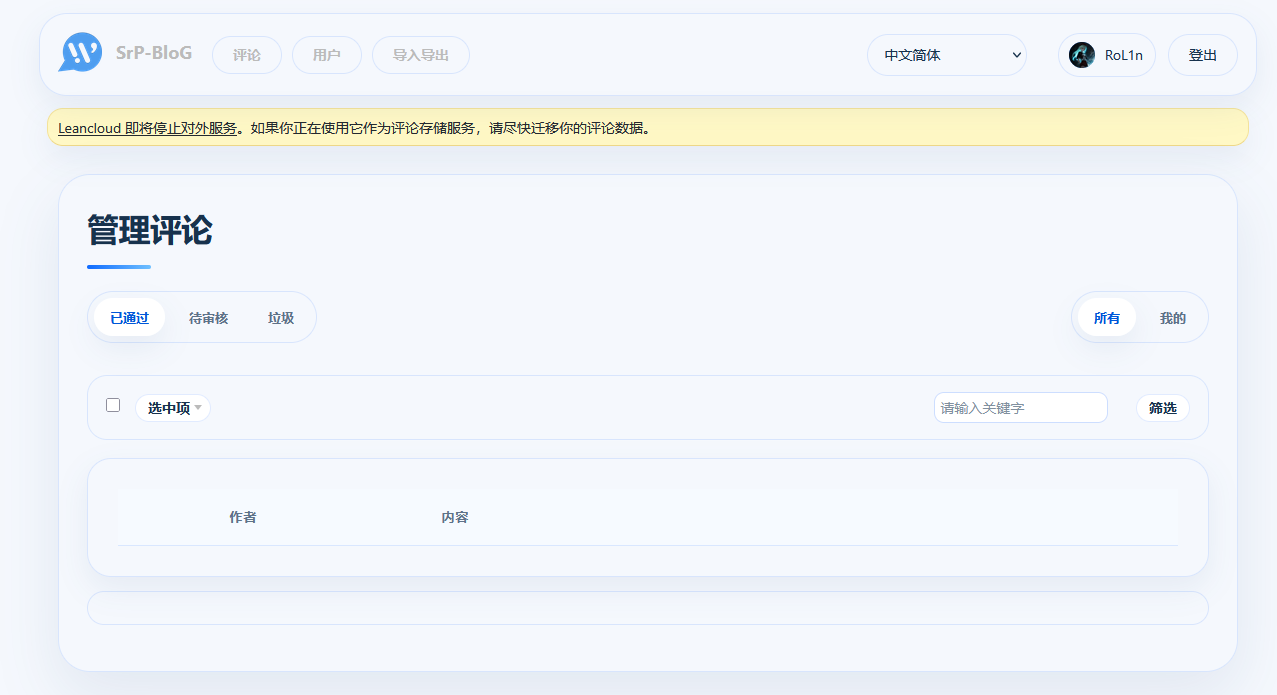
随后https://<your-main-domain>/ui/即为Waline的后台管理面板。